




Do-It-Yourself Sustainability Toolkit User Guide
Project Contact: Tiffany Nguyen | Tiffany.Nguyen@sdcounty.ca.gov | (619) 913-9759
Para leer el manual en español utilice el menú desplegable en el lado derecho del sitio web y seleccione Spanish
Overview
The County of San Diego (County) Do-It-Yourself (DIY) Sustainability Toolkit
Program's User Guide will help you get the most out of the
Do-It-Yourself Sustainability Toolkit by maximizing your energy and
water-savings and reducing your waste. Thank you for checking out the
DIY Sustainability Toolkit! You’re on your way to saving money on your
utility bills and living more sustainably. This handbook will guide
you step-by-step on how to use all the tools contained in this kit and
will provide information and easy-to-follow tips to save energy and
water so that you and your family can help reduce the strain on
resources and reduce your carbon footprint.
With this guide, you received the Energy and Water Use Tracking Form* that will help you take a snapshot of your current energy and water use. Along the way, you will track the equipment you have installed and any behaviors you have changed, and then calculate your estimated savings. Spread the word about your sustainability success! Send us photos or videos and tag us in your sustainability posts by using #SustainableSanDiegoCounty on Facebook, Instagram, and X.
Using the Toolkit: Step by Step
- Review Guide: You’re reading this, so you’re off to a great start! Follow the step-by-step directions for saving energy and water.
- Create a Snapshot of Your Average Energy Use: Use the provided Energy and Water Use Tracking Form* to calculate how much energy you currently use.
- Take Your Sustainability to the Next Level: There’s more you can do beyond this toolkit! Consider making sustainable choices by following the tips included in the guide.
- Tell Everyone You Know About the Kit and How It Helped You: We mentioned this before, but we’re saying it again because it’s that important.
- Fill Out the User Survey: Fill out the DIY Sustainability Toolkit User Survey to let us know how you did!
- Return the Kit: Please return the toolkit, tools, and user guide so we can share it with your neighbors.
Climate Action Plan Background
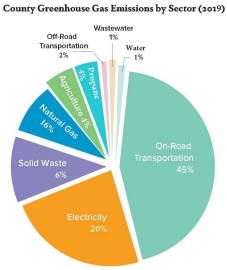
The CAP reduces GHG emissions through 21 enforceable, achievable, and quantifiable measures within five sectors:
- The Built Environment & Transportation sector covers street improvements, fleet efficiency, vehicle electrification, and microtransit.
- The Energy sector covers efficiency, green building, renewable energy generation, and resiliency.
- The Solid Waste sector covers reduction, reuse, recycling, composting, and education.
- The Water & Wastewater sector covers conservation, water wise landscaping, and rainwater harvesting.
- The Agriculture & Conservation sector covers tree planting, equipment replacement, and land conservation.
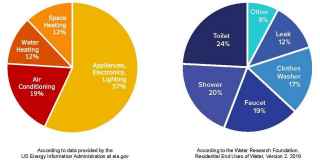
Average Household Energy and Water Usage
Energy Saving Tools
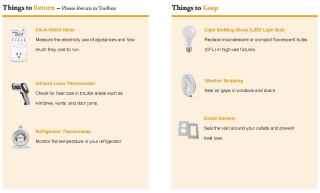
How to Use Energy Saving Tools
-
Kill-A-Watt® Meter
The Kill-A-Watt® meter measures the energy used by appliances and electronics and estimates how much it costs in both operating and standby modes. Did you know that many small appliances and electronics use as much as 75% of energy when off or in standby mode as they do while on? Use this meter to measure the energy usage of your appliances.
How to Use:
1. Look at your most recent energy bill and find the Rate/kWh under “Electric Charges.”
2. Plug the meter into an outlet, then plug an appliance or electronic device you would like to measure into the meter’s outlet.
3. Press and hold the RESET button on the meter until “rESt” appears.
4. Press and hold the SET button until “Rate” is shown and the currently set rate flashes.
5. Input the Rate/kWh cost from your energy bill into the meter and press the SET button to save it.
6. Press the MENU button until “Cost” is shown.
7. Press the UP or DOWN button to see the cost estimates per hour, month, day and year.
Enter this information into the DIY Sustainability Toolkit Energy and Water Use Tracking Form provided with the toolkit. Now that you know which appliances and devices use the most energy, you can identify the items to unplug when not in use. You can also try the meter’s additional features by reading the instruction manual included in the toolkit.
-
Infrared Laser Thermometer
The Infrared Laser Thermometer detects heat gain and loss inside your home.
How to Use:
1. Turn on and point the thermometer at an interior wall or area of average internal home temperature. This is your reference temperature.
2. Point the thermometer at potential trouble spots in your home such as doors, windows, outlets, and exterior walls.
3. To detect small temperature differences, adjust the switch to 1°F. To detect larger temperature differences, adjust it to 5°F or 10°F.
4. The laser color will change depending on the temperature conditions: Green = Good | Red = Gaining Heat | Blue = Losing Heat
If you found any temperature differences by doors and windows while using the Infrared Laser Thermometer, use weather stripping to seal gaps. If an exterior wall or window shows temperature differences, consider adding insulation or upgrading to an energy efficient window design.
-
Refrigerator Thermometer
Use the Refrigerator Thermometer to set optimum temperatures for your refrigerator and freezer. The recommended setting is 36-40°F for refrigerators and 0-5°F for freezers.
How to Use:
1. Place thermometer in your refrigerator between food items. After at least 20 minutes, record the temperature.
2. If it is outside the target range (36-40°F for refrigerator and 0-5°F for freezer) adjust the temperatures.
3. Look and test for cracks in the door seal by closing the door on a piece of paper and tug. Repeat this test in multiple spots around the door. If the paper moves easily in any one spot, replace the seal.
4. Repeat these actions with your freezer.
-
LED Lightbulbs
Reduce your energy bill significantly by switching to energy-efficient lighting. The LED bulbs provided in this kit use at least 75% less energy than incandescent bulbs and last 25 times longer.
How to Use:
1. Replace the incandescent bulbs in fixtures that have the highest use; this will result in the highest savings.
2. Turn off the lamp and wait for the incandescent bulb to cool for 5 minutes.
3. The LED bulbs included in this toolkit are not designed to dim in a dimmable fixture. If you buy your own LED bulbs, read the packaging to see where the bulb should be used; not all LEDs are designed to work in every socket.
4. Match the equivalent wattage of the old bulb. LEDs operate on a much lower wattage than incandescent bulbs. For example, a 60W incandescent can be replaced by a 9W or other 60W equivalent LED.
-
Weather Stripping
Weather Stripping seals the edges of your door or window against the heat and cold.
How to Install:
1. To check for leaks around doors and window jams, you can either use the Infrared Laser Thermometer or try to slide a piece of paper through the area to check for leaks. If you notice heat loss/gain with the thermometer or notice leaks, then that area needs weather stripping.
2. Focus on the sections where you feel air or can see light coming through the window or door jam.
3. Clean the application area to ensure a good seal.
4. Cut a length of weather stripping to match the length of the door or window where the strip will be applied. Peel back adhesive strip and apply.
(More Tips: Instructional Video on How to Apply Weather Stripping)
-
Outlet Gasket
Another way to ensure proper insulation and help prevent air leaks resulting from poor wall insulation is by using outlet gaskets.
How to Install:
1. Identify exterior walls with the most exposure to leaks (you can use the thermal leak detector from page 14).
2. Choose an outlet or switch plate to upgrade.
3. Carefully loosen the faceplate screw with a screwdriver (not provided) and remove faceplate.
4. Place gasket over internal area. If necessary, trim the gasket to fit around the outlet.
5. Replace faceplate cover and tighten screw.
6. Repeat for other outlets or switches throughout your house.
Water Saving Tools
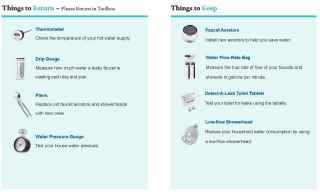
How to Use Water Saving Tools
-
Water Thermometer
Almost half of all the natural gas used in your home is spent heating water. Making a small change to your water heater settings could make a big impact on the amount of natural gas your home uses.
How to Adjust:
1. Locate your water heater.
2. Locate adjustment dial and mark the current setting with a pencil or masking tape.
3. Locate the faucet closest to the water heater.
4. Run water until hot and capture a cupful in a mug. Collect excess water in a pitcher or bucket and use to water plants.
5. Insert thermometer and wait for it to reach its highest point.
6. Record highest point temperature.
7. Adjust setting so that your hot water runs at 120°F. If your water heater does not have specific temperature settings, this action might take a few tries.
8. Some water heaters have pre-set settings like “vacation mode” to save even more energy. Use those as applicable.
-
Water Pressure Gauge
Your household water devices such as showerheads and aerators work best at 60 psi. If your water pressure is higher, it could lead to water waste and even damage to the plumbing pipes in your home. Testing your water pressure regularly is a good idea, even if you have a pressure regulator – they can get old and fail.
How to Test:
1. Locate a hose bib that is close to where your main water supply line enters your house (often near your garage, if you have one).
2. Make sure water isn’t being used anywhere inside or outside your home. Turn off items including washing machines, ice machines on refrigerators, dishwashers, and sprinklers.
3. Remove the hose from the hose bib.
4. Twist the water pressure gauge onto the hose bib.
5. Turn the water all the way on. Tighten the gauge by hand or with an adjustable wrench if it leaks during the test.
6. The black hand shows the current water pressure. If left on overnight, the red hand will hold the highest surge pressure which occurred during that period.
7. Typical home water pressure ranges from 40-75 psi and should not exceed 60 psi. If your pressure is over 75 psi, then adjust your pressure regulator (if you have one) down to 60 psi or install a pressure regulator.
-
Water Flow Rate Bag
Using the water flow rate bag, you will measure the rate the water from your faucets and showerheads flow. Even if you have low flow aerators, it can be helpful to check the flow rate because aerators can corrode over time.
How to Measure:
1. Turn on faucet and fill water flow rate bag for 5 seconds.
2. Record the gallons per minute measured on the flow rate bag.
3. If your water is flowing at a rate greater than below, we’ll explain how to fix it on the following pages by installing aerators.
- Bathroom Sink: 0.5 gpm
- Kitchen Sink: 1.5 gpm
- Showerhead: 2.0 gpm
-
Drip Gauge
A dripping faucet wastes water. Find out how much a water faucet is leaking so you can measure how much you can save.
How to Measure:
1. To measure a leaky faucet, hold the empty drip gauge under the drip for 5 seconds.
2. Set drip gauge on a level surface and look at the gallons per day (GPD) and gallons per year (GPY) markings to see how much water is leaking each day and year. Visit https://water.usgs.gov/edu/activity-drip.html to see how much the leak costs.
3. Enter this into the Tracking Energy and Water Use forms.
(More Tips: Instructional Video on How to Fix a Leaking Faucet).
-
Faucet Aerators
Did You Know? Over half of all water use inside the home takes place in the bathroom. Installing aerators saves an average of 1.2 gallons per person per day. After measuring the flow rate of your aerators and showerheads using the flow rate bag, see if the flow rates match the flow rates we have listed. If they are higher than our list, replace them to help save water.
- Bathroom Sink: 0.5 gpm
- Kitchen Sink: 1.5 gpm
- Showerhead: 2.0 gpm
How to Install:
1. Close or plug your drain.
2. Unscrew old aerator counterclockwise; if needed, use pliers to loosen the aerator. Wrap the teeth of the pliers with painter’s tape or a towel to avoid scratches to the existing equipment.
3. Clean and dry water pipe threads (grooves at end of faucet).
4. Screw on new aerator clockwise by hand. 5. Turn on faucet to test for leaks and tighten with pliers if necessary.
-
Low-Flow Showerhead
There are two ways to measure your showerhead flow rate. Check the imprint on the showerhead for flow rate or use the flow rate bag to measure if one is not noted. If the showerhead flows at more than 2.0 gpm, replace it with the showerhead provided.
How to Install:
1. Replacing a showerhead is just like replacing or installing aerators.
2. Close or plug your drain.
3. Unscrew the old showerhead counterclockwise. Use the pliers to loosen the showerhead, if needed. Wrap the teeth of the pliers with painter’s tape or a towel to avoid scratches to the existing equipment.
4. Clean and dry water pipe threads (grooves at end of faucet).
5. Screw on new showerhead clockwise by hand.
6. Turn on faucet to test for leaks and tighten with pliers, if necessary.
-
Water Leak Detection Dye Tablets
A toilet that runs constantly can waste up to 200 gallons of water per day, costing $250 over the course of a year. The Detect-A-Leak Toilet Tablets, also known as Water Leak Detection Dye Tablets, are a simple and inexpensive way to test for leaks regularly.
How to Measure:
1. Carefully remove tank lid.
2. Drop 1-2 tablets into exposed tank.
3. Wait 20-30 minutes. Do not flush the toilet during this time.
4. If blue color appears in the toilet bowl, you have a toilet leak.
5. Typically, a leaky flapper is the cause of toilet leaks and needs to be replaced.
How to Calculate Your Energy Usage
The first step in understanding what your current energy usage looks like to calculate your energy savings. Use this guide to review your utility bill and the Energy and Water Use Tracking Form* to calculate your average energy usage. You will receive a single bill from San Diego Gas & Electric (SDG&E), your utility provider responsible for delivering electricity, maintaining power lines, and handling billing services. San Diego Community Power (SDCP) is your electricity provider that sources clean energy on your behalf. Your energy bill includes two main components: electricity delivery charges from SDG&E and electricity generation charges from SDCP.
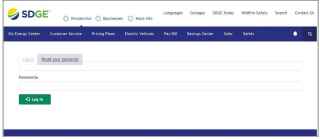
How to Download Your Energy Bill
- Log in to your SDG&E® account
- Click the Bills & Payments tab » Bill History
- Click on Statement Date for the three (or more) most recent billing periods to download PDFs of your bills
- To get a copy of your energy bill mailed to you, call SDG&E at 1-800-411-7343
How to Read Your Energy Bill
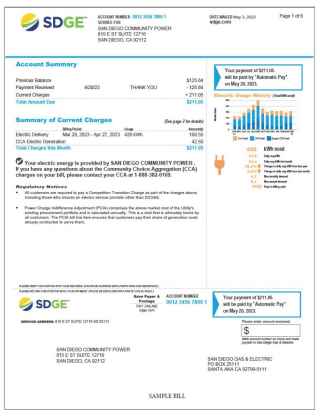
The first page of your SDG&E bill gives you a general overview of your energy use for that month (in kilowatt-hours) and a summary of current charges for the total amount owed, including two main charges—SDG&E’s electric delivery charge for transporting electricity through the grid and SDCP’s electric generation charge for providing electricity (More Tips: Instructional Video on How to Read Your Electric Utility Bill)
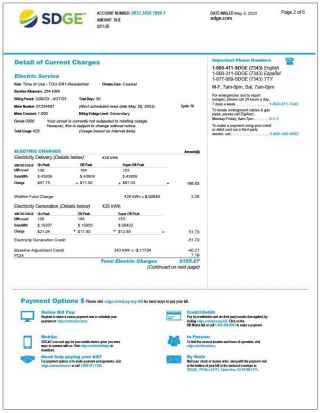
The next few pages of your bill will break down your gas and electricity charges in detail. This includes SDG&E’s electric delivery charges for transporting electricity, and SDCP's electric generation charges for supplying your energy. You’ll also see an electric generation credit, which reflects what SDG&E would have charged for generation to avoid duplicate billing. The power charge indifference adjustment (PCIA) is a standard SDG&E fee to cover legacy energy contracts. If enrolled in Power100, you’ll see an additional $0.01 per kWh charge for 100% renewable energy.
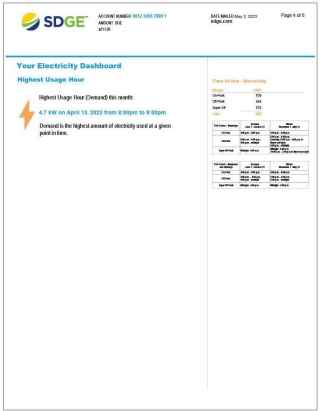
This page identifies your highest usage hour over the billing period and outlines the specifics of the Time-of-Use (TOU) schedules associated with your rate. This section of your bill will show the hourly and seasonal pricing and your bill savings compared to the former standard rates. Understanding when you use the most energy can help you make changes to your routine.
How to Read Your Water Bill
- The service period shows the timeframe the bill covers.
- The bill includes the approximate date when your meter will be read next.
- This is where you can find your total water consumption for the billing service period. 1 billing unit = 748 gallons of water
- The graph provides your previous year’s consumption. The table provides the current read and previous read. It also shows the previous year’s usage for the same service period and the percent change.
- All water meters are assigned an identification number, which is stamped on the metal lid. Verify your meter number by reading your meter in-person.

Energy Saving Tips
County residents can save energy without affecting their quality of life by simple actions like cleaning and maintaining appliances to improve performance and knowing how and when you consume energy. Here are some more tips to reduce your home’s energy use:
-
Time-of-Use Energy Rates
When you use energy is just as important as how much you use. With Time-of-Use plans, prices are lower all day except between the hours of 4 p.m. and 9 p.m. Each day is broken into different time periods: On-Peak, Off-Peak, and Super Off-Peak.
On-Peak Time: 4 p.m - 9 p.m.
Highest Demand for Energy = Highest Prices.
Avoid using appliances at this time!
Off-Peak & Super Off-Peak Time: 9 p.m. - 4 p.m.
Lower Demand for Energy = Lower Prices.
Prioritize appliance use at this time!
Energy costs are lower during the off-peak and super off-peak time periods and highest during the on-peak periods, so try to run larger appliances like washing machines, dryers, dishwashers, and pool pumps outside of on-peak times. Also, consider setting your thermostat higher by a few degrees while you’re away from the house during the day.
-
Optimal Thermostat Settings
Conditioning a space with heat or cool air is the most expensive and energy consuming activity that occurs in your home throughout the year. Recommended thermostat settings for the winter months are 68° and for the summer months are 78°.
-
Reducing “Phantom” Energy Use
"Phantom" energy is the electricity used by devices when they are plugged in but not being used. Over time, these devices use a small amount of power even when turned off or on standby which can add up and increase your energy bill.
Try to unplug small appliances, including toasters, coffee pots, and phone chargers, when not in use, or plug all appliances into a power strip to switch off when not in use. In your entertainment and computer areas, plug equipment into a Smart Strip which will shut off equipment when in standby mode.
Water Saving Tips
-
Saving Indoors
- Brushing Teeth: Turn water off while brushing your teeth and shaving.
- Upgrade Toilet: Upgrade old, inefficient toilets (3.5 gallons per flush or more) to high efficiency or dual flush toilets.
- Shower Timer: Make use of a shower timer, which helps you save water and energy at the same time. Try to take five minute showers or less.
- Insulating Pipes: Insulate the pipes leading from the water heater and use an insulating sleeve on the actual heater. This helps to save water as you wait for the water to heat up and saves energy!
- Vacation Mode: Set your water heater to “Vacation Mode” to conserve energy when you are away for long periods of time.
- Energy Guide: Check the Energy Guide sticker when purchasing a new hot water heater. It provides the estimated cost to run the equipment.
- Recirculation Pump: Do you have a recirculation pump? These pumps can save water, but only if the timer is set correctly.
- Tankless Water Heater: To conserve even more energy, you can replace your current water heater with a tankless water heater. Tankless water heaters heat water directly without the use of a storage tank.
- More Tips: Review the County’s CAP page for updates and resources that will help you save water and become more energy efficient.
-
Saving Outdoors
- Irrigation Leaks: Regularly check for and fix leaks in your irrigation system; leaks can waste thousands of gallons of water annually.
- Drip Irrigation: Consider switching to a drip irrigation system to save water.
- Timing Watering: Water when temperatures and wind are the lowest: in the evenings and the mornings before sunrise. This reduces evaporation and allows water to soak deeper into your landscaping.
- Irrigation Controls: Change your irrigation schedule for each season depending on local weather conditions. Consider upgrading to a weather-based irrigation controller.
- Drought Resistant Plants: Remove part or all of your grass and plant native, drought-resistant species. These will require much less water and will help reduce your water and energy bills.
- Car Washing: When your car needs a wash, be sure to visit a commercial car wash that recycles wash water. A home car wash uses 80-140 gallons of water, whereas most commercial car washes with water recycling use 30-45 gallons. Washing your car on your driveway or in the street sends dirty water, soap, heavy metals, oil, and grease into the gutter, which flows to local creeks and the ocean.
- Pool Filter Scheduling: Pool filters are energy intensive. Consider reducing your filter times in the fall and winter and set timers to avoid peak utility rates. Using a pool cover will save even more energy and water.
- More Tips: Review the County of San Diego Waterscape Rebate Program for updates and resources that will help you save water and become more energy efficient.
Make Sustainable Choices
Review the County’s CAP page for resources that will help you become more energy efficient and save water. Additionally, here are a few simple actions you can consider taking to make a difference in your community. Every little action adds up and together we can make a difference! Click on an action below to learn more.
Thank You For Your Participation!

By using this toolkit, you’ve conserved vital resources and reduced waste. Living more sustainably saves you money and also helps to protect the environment!
Please return the toolkit (with items to return listed above) to the location where you checked it out on the select dates and times included in your confirmation email. If you need any assistance with returning the toolkit or have any questions, please email Tiffany.Nguyen@sdcounty.ca.gov or call (619) 913-9759.
Once you return the toolkit, please consider completing the voluntary User Survey and sharing your experience on social media. Snap a photo, post a video, or tell your story using #SustainableSanDiegoCounty and tag us on Facebook, X, and Instagram.
*These documents are provided for reference only and any posted before 04/26/27 may not meet current ADA accessibility standards. If you need this information in an accessible format, please contact us at CAP@sdcounty.ca.gov.


 Climate Action Links